

Table of Contents
Website navigation does much more than help visitors move from one page to another. It also helps search engines understand your website structure, identify important pages, and discover new content. A well planned navigation system improves user experience while making it easier for Google to crawl and index your website.
Many websites use more than one navigation menu. For example, they may include a primary header menu, a secondary category menu, a footer menu, and even contextual navigation within articles. When designed correctly, multiple navigation menus improve usability without harming SEO.
The important question is not whether you should have multiple navigation menus. The real question is whether those menus help visitors find information quickly while supporting your site’s information architecture.
This guide explains how multiple navigation menus influence SEO, when they help, when they become a problem, and how to design them following Google’s people first content principles.
Quick Answer
Yes, multiple navigation menus can improve SEO when they organize content logically, strengthen internal linking, and enhance user experience. Poorly designed or repetitive navigation menus can confuse users, dilute internal link value, and make website architecture harder for search engines to understand.
What Are Multiple Navigation Menus?
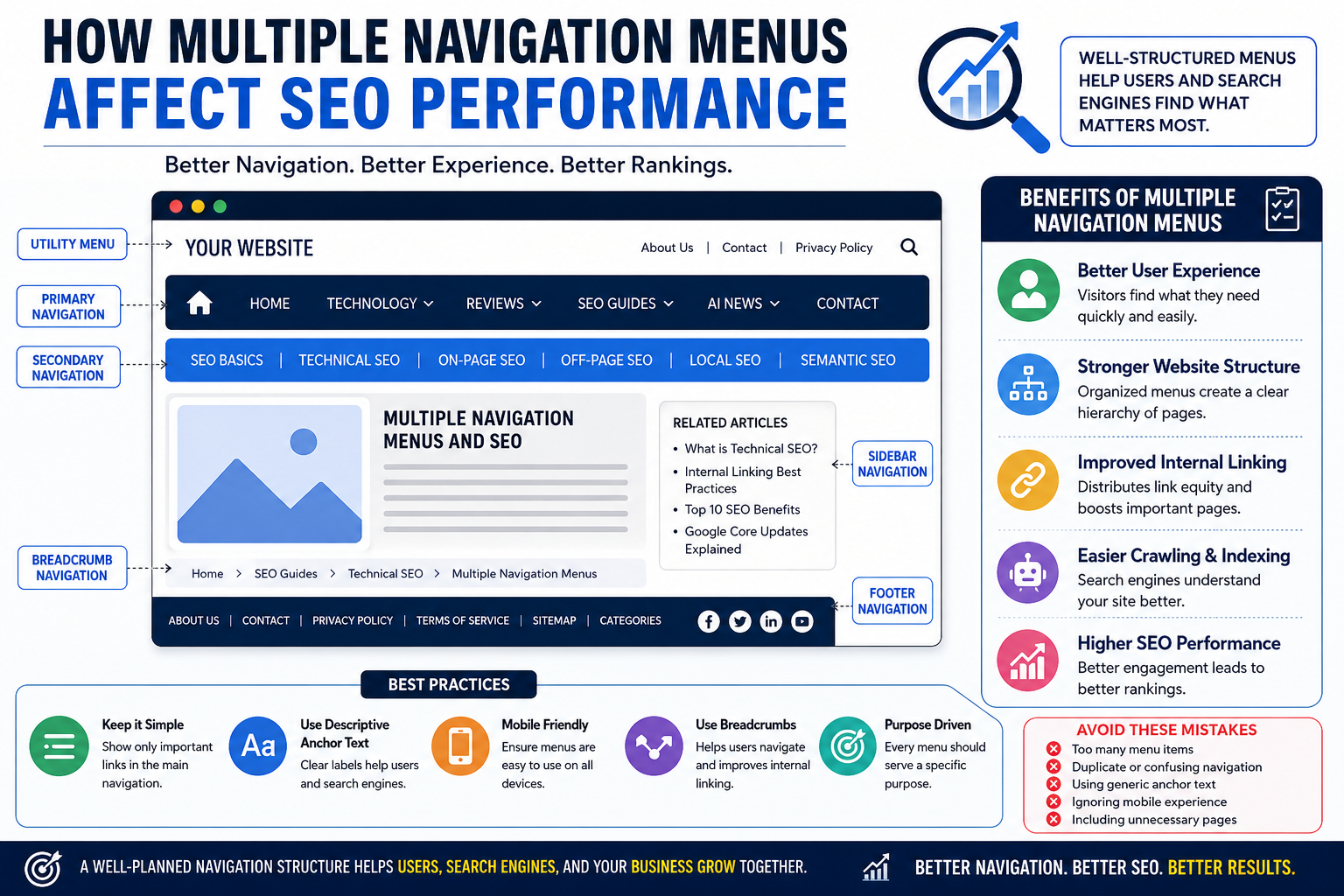
Multiple navigation menus refer to using different navigation areas across a website instead of relying on a single menu.
A modern website commonly includes:
- Primary header navigation
- Secondary category navigation
- Footer navigation
- Sidebar navigation
- Breadcrumb navigation
- Contextual navigation inside articles
Each menu serves a different purpose while helping visitors reach relevant content faster.
For example, an SEO blog may use:
| Navigation Menu | Purpose |
|---|---|
| Header Menu | Main website sections |
| Category Menu | SEO, AI, Technology, Reviews |
| Breadcrumb | Show current page location |
| Footer Menu | Important pages and policies |
| Related Articles | Keep users engaged |
Each navigation area supports both usability and website organization.
Why Navigation Matters for SEO?
Google uses internal links to understand relationships between pages.
Navigation menus naturally create internal links across your website.
A clear navigation structure helps Google:
- Crawl important pages faster
- Understand topic relationships
- Identify priority pages
- Distribute internal authority
- Improve index coverage
Good navigation also helps users complete their journey without frustration.
When visitors easily find useful information, they usually:
- Stay longer
- Visit more pages
- Return later
- Share content
- Build trust in your brand
These positive engagement signals support long term SEO success.
Benefits of Multiple Navigation Menus
Better User Experience
- Visitors expect to find information quickly.
- Different users have different goals.
- Some visitors want your latest articles.
- Others want product reviews.
- Some may look for contact information.
Multiple navigation menus allow each audience to reach the correct section without unnecessary clicks.
A better user experience often leads to:
- Lower bounce rates
- Higher engagement
- More page views
- Longer session duration
Improved Website Organization
As websites grow, a single menu becomes difficult to manage.
Multiple navigation menus divide content into logical sections.
Instead of displaying dozens of links in one location, you organize information based on user intent.
For example:
Primary Menu
- Home
- Technology
- Lifestyle
- Reviews
Secondary Menu
- SEO
- AI
- Mobile
- Digital Marketing
This hierarchy creates a cleaner browsing experience.
Stronger Internal Linking
Navigation menus automatically create internal links.
Internal links help search engines discover important content while distributing authority across related pages.
A structured internal linking strategy also supports topical authority.
For example, an SEO section can naturally connect articles about:
- Technical SEO
- Semantic SEO
- Google Updates
- AI Search
- Internal Linking
Google understands these relationships more effectively.
Easier Crawling and Indexing
Google crawlers follow internal links to discover pages.
Well structured navigation reduces orphan pages and improves crawl efficiency.
Google recommends creating websites that help users and search engines understand page relationships naturally instead of forcing complex navigation structures.
How Multiple Navigation Menus Can Hurt SEO
Multiple navigation menus are helpful only when they remain simple and purposeful.
Poor implementation creates problems.
Too Many Navigation Links
- Large navigation menus with hundreds of links reduce clarity.
- Visitors may struggle to identify important sections.
- Search engines may also find it harder to determine page priority.
- Focus only on valuable pages.
- Avoid adding every page into every menu.
Duplicate Navigation
Repeating identical navigation menus across every section adds little value. Instead, give each menu a specific role.
For example:
- Header menu for major categories.
- Footer menu for important resources.
- Sidebar menu for related topics.
- Each menu should solve a different user need.
Confusing Website Structure
When menus overlap or contain inconsistent labels, visitors become confused.
Examples include:
- Blog
- Articles
- Resources
- Learning Center
If all four lead to similar content, users may not understand the difference. Use consistent naming throughout the website.
Best Practices for Using Multiple Navigation Menus
Designing multiple navigation menus requires balancing user experience with SEO. Every menu should have a clear purpose and guide visitors toward valuable content.
Keep Your Primary Navigation Simple
Your primary navigation is the first thing most visitors see. Limit it to your most important website sections.
A good example includes:
- Home
- Technology
- Reviews
- Lifestyle
- Blogs
- About Us
- Contact
Avoid adding every category to the main navigation. Simple navigation helps users make faster decisions.
Create Logical Categories
Group related pages together. Instead of creating separate menu items for every article, organize content under broader categories.
Example:
Technology
- SEO
- Artificial Intelligence
- Mobile Technology
- Cybersecurity
Reviews
- Smartphones
- Laptops
- Software
- Accessories
This structure improves usability and helps Google understand topical relevance.
Use Descriptive Anchor Text
Navigation labels should clearly explain where the link leads.
Good examples include:
- SEO Guides
- Laptop Reviews
- AI News
- Mobile Technology
Avoid vague labels such as:
- Learn
- Click Here
- More
- Resources
Clear anchor text helps both users and search engines understand the destination page.
Make Navigation Mobile Friendly
More than half of website visitors now browse using smartphones.
Your navigation should work equally well on desktops, tablets, and mobile devices.
Mobile navigation should:
- Open quickly
- Display readable text
- Include touch friendly buttons
- Avoid excessive nested menus
- Keep important links easy to access
Google also considers mobile usability as part of the overall page experience.
Use Breadcrumb Navigation
Breadcrumbs improve navigation by showing visitors exactly where they are.
Example:
Home → Technology → SEO → Multiple Navigation Menus
Benefits include:
- Better user orientation
- Additional internal links
- Improved website hierarchy
- Easier navigation back to previous pages
Breadcrumb structured data can also improve how your pages appear in Google Search.
Keep Every Menu Purpose Driven
Each navigation menu should solve a specific problem.
| Navigation Menu | Main Purpose |
|---|---|
| Header Menu | Main website sections |
| Secondary Menu | Topic categories |
| Sidebar | Related resources |
| Breadcrumb | Current page location |
| Footer | Company information and important pages |
Avoid creating multiple menus that repeat the same links.
Common Navigation Mistakes That Hurt SEO
Many websites accidentally reduce their SEO performance because of poor navigation planning.
Adding Too Many Menu Items
Visitors should not feel overwhelmed. A menu with dozens of links becomes difficult to scan. Instead, prioritize the pages that matter most.
Using Generic Menu Labels
Labels such as:
- Services
- Resources
- Information
do not communicate enough value.
Specific labels perform better because users immediately understand what to expect.
Ignoring Internal Linking Opportunities
Navigation menus should work together with contextual internal links.
For example, an article about Multiple Navigation Menus can naturally link to related content such as:
- Unlocking SEO Success: Mastering Authority, Relevance and User Experience
- Why the SEO Importance for Content Marketing
- Top 10 Benefits of SEO
- Ranking Signal and Ranking System
- No SEO Is Perfect
These internal links strengthen topical authority and improve content discovery.
Forgetting Footer Navigation
Many website owners focus only on the header.
Footer navigation helps users quickly access:
- About Us
- Contact
- Privacy Policy
- Categories
- Important resources
It also provides additional crawl paths for search engines.
Poor Mobile Experience
If visitors struggle to use your menu on a smartphone, they are likely to leave your website.
Always test navigation on different screen sizes before publishing.
Does Google Recommend Multiple Navigation Menus?
Google does not limit the number of navigation menus a website can have.
Instead, Google encourages website owners to create content and page structures that help people first.
A clear navigation structure supports:
- Better user experience
- Easier crawling
- Better understanding of page relationships
- Logical website architecture
Google’s Helpful Content guidance recommends creating websites that satisfy users instead of focusing only on search engine rankings. Navigation should exist to help visitors complete their tasks efficiently.
Frequently Asked Questions
Do multiple navigation menus improve SEO?
Yes. Multiple navigation menus can improve SEO when they organize content clearly, strengthen internal linking, and make navigation easier for visitors.
Can too many navigation links hurt rankings?
Yes. Excessive navigation links may confuse users, reduce clarity, and make it harder for search engines to identify your most important pages.
What is the ideal number of navigation menus?
There is no fixed number. Most websites benefit from a primary menu, footer menu, breadcrumb navigation, and contextual navigation where appropriate.
Are dropdown menus bad for SEO?
No. Well designed dropdown menus do not hurt SEO. They should remain simple, accessible, and easy for users and search engines to understand.
Should every page appear in the navigation menu?
No. Include only your most important pages. Less important pages can be accessed through contextual internal links or category pages.
Conclusion
Multiple navigation menus are not an SEO problem when they are designed with users in mind. In fact, they can improve website usability, strengthen internal linking, and help search engines understand your site structure more effectively.
The key is to keep every navigation menu simple, organized, and purpose driven. Each menu should guide visitors toward relevant content instead of overwhelming them with too many choices. A logical navigation structure improves user satisfaction, supports efficient crawling, and helps build topical authority across your website.
As your website grows, regularly review your navigation menus to ensure they continue to meet user needs. Remove unnecessary links, update outdated categories, and test navigation on both desktop and mobile devices. Small improvements to navigation can lead to better engagement, improved crawlability, and stronger long term SEO performance.
At GK News Magazine, we believe that great SEO starts with a great user experience. A well planned navigation system helps visitors find valuable information quickly while giving search engines the context they need to understand your content.
Comments are closed.